
Different countries have different payment methods, you can check the detailed information when you proceed to pay on the payment page.
1.Pay with Paypal
PayPal provides an easy and quick way to send and request money online. You can transfer money (abroad) to family, friends, online shops, and auction sites.PayPal can be used at Kemedress.com to purchase items by Credit Card (Visa, MasterCard, Discover, and American Express), Debit Card, or E-check (i.e. using your regular Bank Account). You can click check out with PayPal after viewing your items on your shopping bag page. Then you will leave Kemedress.com and enter PayPal's website. You can sign in to your Paypal account, or you can create a new one if you haven't got one. According to the on-screen instructions, you can use the Paypal as you want. Usually, PayPal e-check will take 3-5 business days to be confirmed by Paypal. The reasons why we suggest you use Paypal: Payment is traceable. Using your PayPal account you can trace the status of your payment. When you make the payment for your order, you need not use your credit card online (you can transfer directly from your bank account). When you use your credit card through Paypal, Kemedress.com will not take your credit card number, which will minimize the risk of unauthorized use.
2.Pay with Credit Card
If you do not have a Paypal account,you can pay with Credit Card With Paypal.Check the steps.
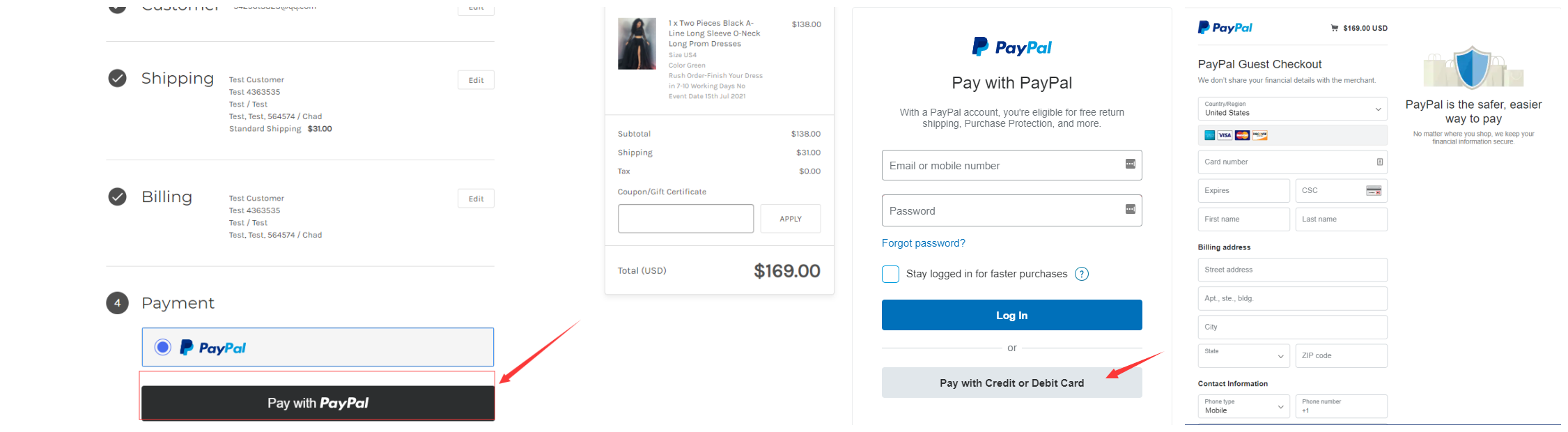
Buyers can pay securely by credit card directly. Please note that Kemedress does not collect your credit/debit card number or personal information when you make a payment. For questions regarding your transactions on our site, please consult your card-issuing bank for more information. If credit card payment is not successful, please do not worry, please refer to the following solutions: Common reasons for declined payments Your bank or credit card company will know why your credit card or direct debit was declined. Still, here are some common reasons for declines, which might help you troubleshoot. Check the content below to see details about each kind of decline.
1).Your card reached its limit: Check your credit limit. Check the maximum amount your card can be charged at a single time. Check how many times your card can be charged in a given time period. Check to see if your card allows online transactions. Ask your credit card company whether they allow automated billing, or whether they can occasionally call to verify a charge. Make sure that your card can accept international charges.
2).Your credit card information was incorrect Review the expiration date on your credit card. Check that the credit card number is correct and up-to-date. Does the telephone number and billing address you gave for your credit card match those that your credit card company has?
3).Other Errors. These can happen for a variety of reasons. Call your bank's Level 2 support to find out why these payments were rejected. * Declined * Do Not Honor * Processor Declined * Transaction Not Allowed What can I do to resolve a payment issue? To resolve a payment issue, the first thing to do is call your bank (or credit card provider). Request to speak to the Level 2 support. Usually, call centre support agents won't have access to the information required to resolve a payment issue, and they will simply claim that your card is working fine. Speaking to Level 2 support is essential to find out why your bank rejected your payment. Explain to your bank or credit card's support services that you attempted to make a payment to Kemedress, give the date, and tell your bank what error code and message was returned. Ask your bank to explain why they declined the payment, and ask them what they will do in order for the card not to be rejected again. Once your bank has confirmed that they've resolved the issue (e.g. lifted the restriction, or changed some system settings), try the payment again by completing the checkout process from the Kemedress payment page.
What can I do if my payment still fails after following your steps? If you're still encountering payment issues after following the steps above, try a different credit or debit card. Alternatively, you can try using a Paypal account. Use the link on the payment page with the logo “Paypal ”. Be aware that if you're funding the payment with the same credit card, but connected in Paypal, the credit card provider may still reject the transaction. If you continue to see errors when attempting to make a payment, please contact us.